> ## Documentation Index
> Fetch the complete documentation index at: https://visitdocs.planpoint.io/llms.txt
> Use this file to discover all available pages before exploring further.
# Floor plan editor for buyers
> Visitors can furnish the floor plan themselves — and take the result away as a PDF.
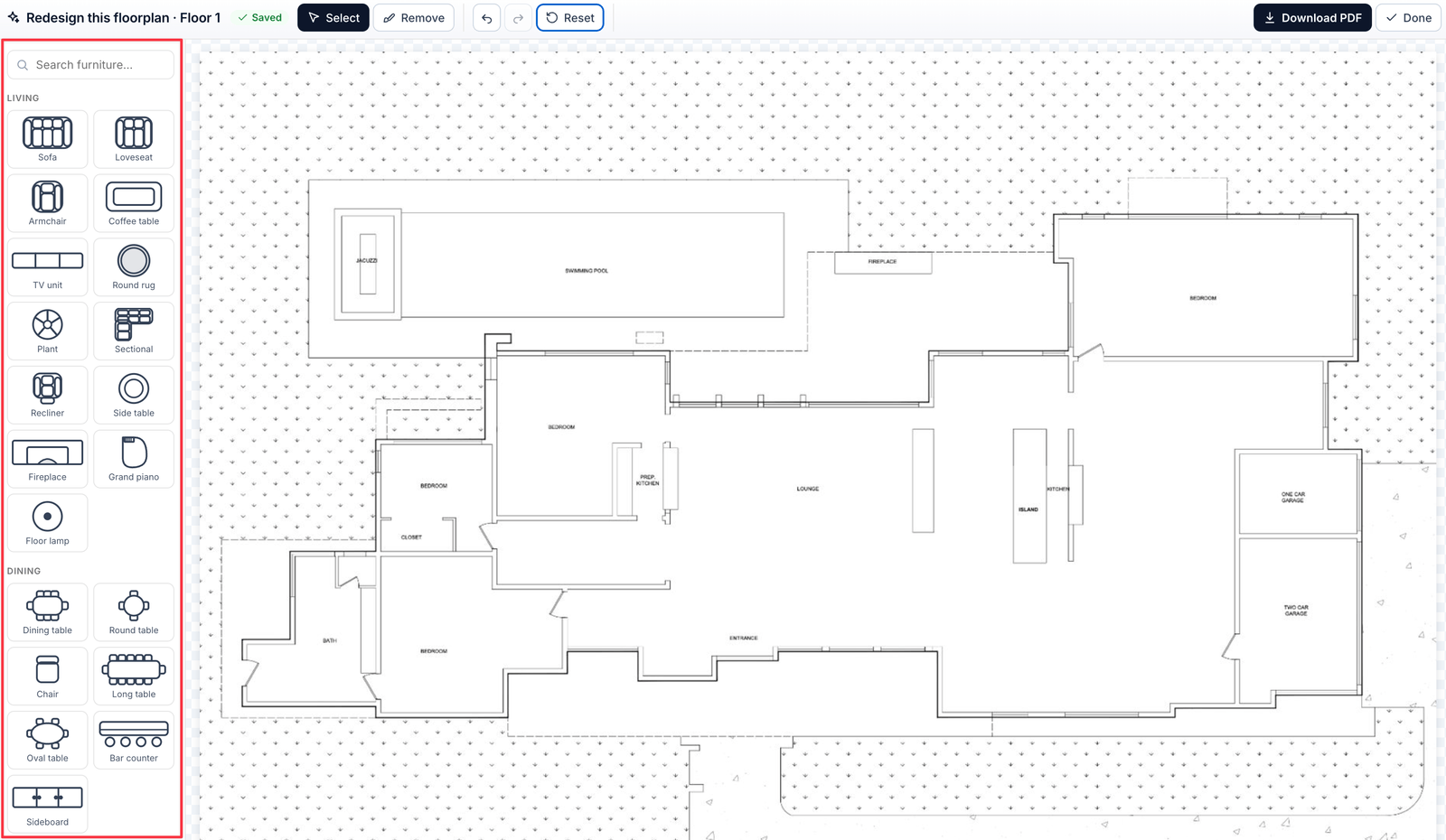
On the floor plan view there is an **Open Editor** button. It hands the plan to the visitor: they can drag furniture onto it, arrange a layout and download the result.
 ## What visitors can do
* **Place furniture** from a catalogue of 76 symbols — sofas, beds, tables, appliances, sanitary ware, plants
* **Move, rotate and resize** anything they place; rotation can also be typed as an exact angle
* **Recolour** items with the swatch row
* **Erase** with the eraser tool, or **Undo / Redo** any step
* **Download PDF** to take the plan away
A **Saved** indicator confirms their work is kept.
## Where the layout is stored
Everything a visitor places is saved in **their own browser** only. It never reaches your dashboard and no other visitor sees it. Coming back on the same device restores the layout; a different device starts empty.
This is a buyer's sandbox, not a shared workspace. There is no way to receive or review a visitor's layout.
Upload plans as **unfurnished** as you can get them. A drawing that is already fully furnished gives the visitor less to do, and less reason to spend time in the Visit.
## Why it matters
Time on plan is the strongest engagement signal there is. A buyer measuring whether their sofa fits is a buyer who has already moved in mentally — and the PDF they download carries your Visit into the conversation with their partner.
## Preparing plans for the editor
* Use a **clean, high-resolution plan** — the editor zooms in
* Include the room dimensions on the plan image if you have them; visitors use them to judge scale
* Avoid plans with heavy pre-drawn furniture, which clashes with placed symbols
## What visitors can do
* **Place furniture** from a catalogue of 76 symbols — sofas, beds, tables, appliances, sanitary ware, plants
* **Move, rotate and resize** anything they place; rotation can also be typed as an exact angle
* **Recolour** items with the swatch row
* **Erase** with the eraser tool, or **Undo / Redo** any step
* **Download PDF** to take the plan away
A **Saved** indicator confirms their work is kept.
## Where the layout is stored
Everything a visitor places is saved in **their own browser** only. It never reaches your dashboard and no other visitor sees it. Coming back on the same device restores the layout; a different device starts empty.
This is a buyer's sandbox, not a shared workspace. There is no way to receive or review a visitor's layout.
Upload plans as **unfurnished** as you can get them. A drawing that is already fully furnished gives the visitor less to do, and less reason to spend time in the Visit.
## Why it matters
Time on plan is the strongest engagement signal there is. A buyer measuring whether their sofa fits is a buyer who has already moved in mentally — and the PDF they download carries your Visit into the conversation with their partner.
## Preparing plans for the editor
* Use a **clean, high-resolution plan** — the editor zooms in
* Include the room dimensions on the plan image if you have them; visitors use them to judge scale
* Avoid plans with heavy pre-drawn furniture, which clashes with placed symbols