> ## Documentation Index
> Fetch the complete documentation index at: https://visitdocs.planpoint.io/llms.txt
> Use this file to discover all available pages before exploring further.
# AI Reimagine
> Let buyers restyle a room with AI, directly inside the Visit.
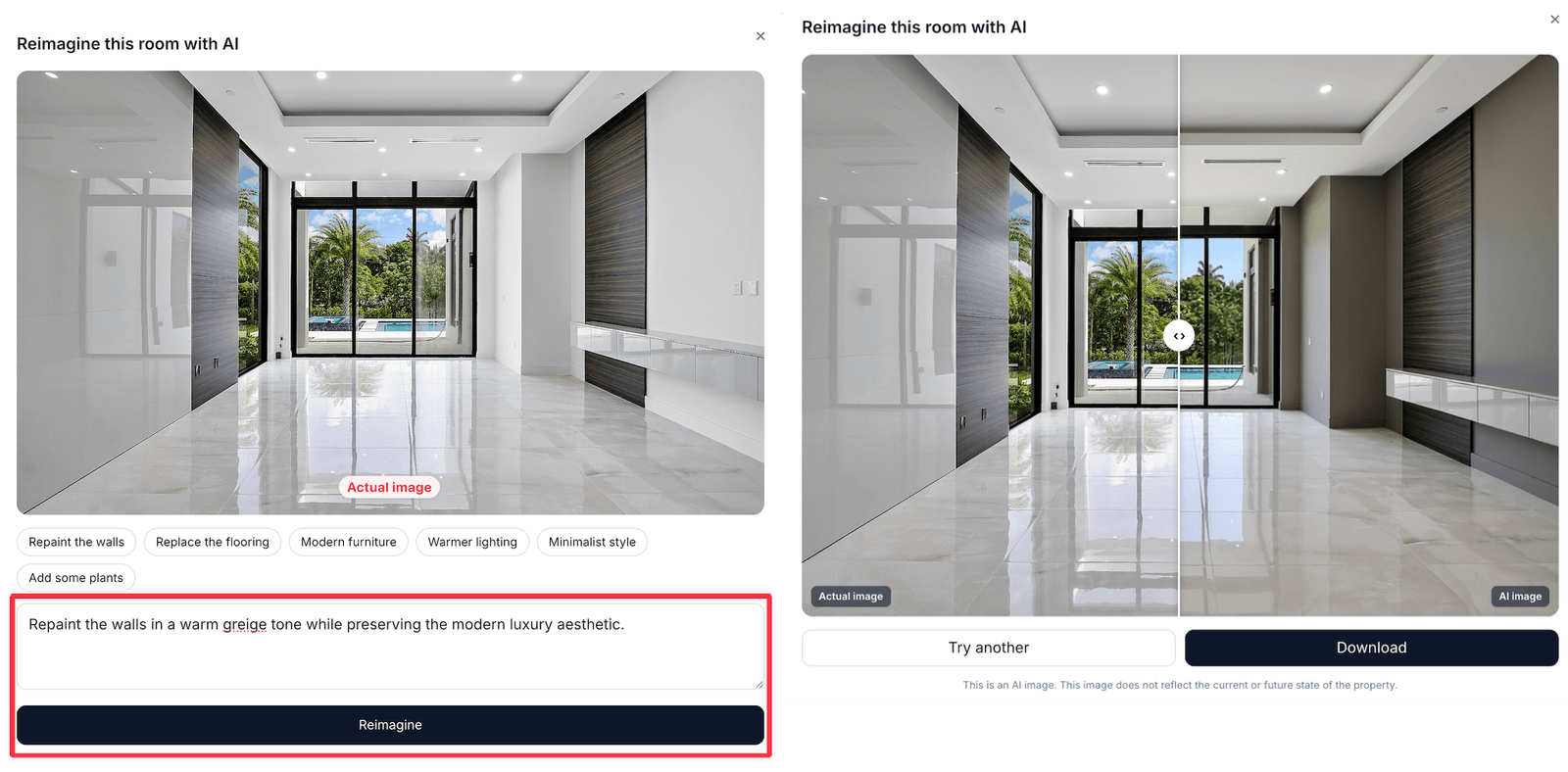
Every room photo carries a **Reimagine this room with AI** button. A buyer describes the look they want, and a restyled version of *their* room comes back — same walls, same windows, different world.
 ## How a buyer uses it
Any room with a photo shows the Reimagine button under the image.
Type a prompt, or tap one of the example badges — *Scandinavian*, *Minimalist*, *Warm and cosy*, and so on — to fill it in.
The result appears in place after a few seconds.
Switch back to the original at any time, or run another prompt with a different style.
The generated image is temporary and personal to that visitor. It never replaces your photo and is not shown to anyone else.
## Why it sells
Empty or dated rooms are the hardest to sell because buyers cannot picture themselves in them. Reimagine turns "needs work" into "could look like this" without a staging budget — and the reimagines a property attracts are a strong signal of interest, which is why they are counted in [Analytics](/features/analytics).
## Getting good results
The quality of the output follows the quality of the input photo:
* **Well-lit, straight-on shots** reimagine best
* **Wide shots showing the whole room** give the model more to work with
* Very dark or heavily cluttered photos produce muddier results
Test it yourself on each property's weakest room before you share the link. If a room reimagines badly, a better source photo usually fixes it.
## Notes
* Reimagine needs the room to have a [room photo](/build/rooms). Rooms without one do not show the button.
* The feature is on by default for every Visit; nothing to configure.
* Results are not saved to your property and cannot be downloaded into the editor.
## How a buyer uses it
Any room with a photo shows the Reimagine button under the image.
Type a prompt, or tap one of the example badges — *Scandinavian*, *Minimalist*, *Warm and cosy*, and so on — to fill it in.
The result appears in place after a few seconds.
Switch back to the original at any time, or run another prompt with a different style.
The generated image is temporary and personal to that visitor. It never replaces your photo and is not shown to anyone else.
## Why it sells
Empty or dated rooms are the hardest to sell because buyers cannot picture themselves in them. Reimagine turns "needs work" into "could look like this" without a staging budget — and the reimagines a property attracts are a strong signal of interest, which is why they are counted in [Analytics](/features/analytics).
## Getting good results
The quality of the output follows the quality of the input photo:
* **Well-lit, straight-on shots** reimagine best
* **Wide shots showing the whole room** give the model more to work with
* Very dark or heavily cluttered photos produce muddier results
Test it yourself on each property's weakest room before you share the link. If a room reimagines badly, a better source photo usually fixes it.
## Notes
* Reimagine needs the room to have a [room photo](/build/rooms). Rooms without one do not show the button.
* The feature is on by default for every Visit; nothing to configure.
* Results are not saved to your property and cannot be downloaded into the editor.