> ## Documentation Index
> Fetch the complete documentation index at: https://visitdocs.planpoint.io/llms.txt
> Use this file to discover all available pages before exploring further.
# Social previews
> What people see when your Visit link is pasted into a message, email or post.
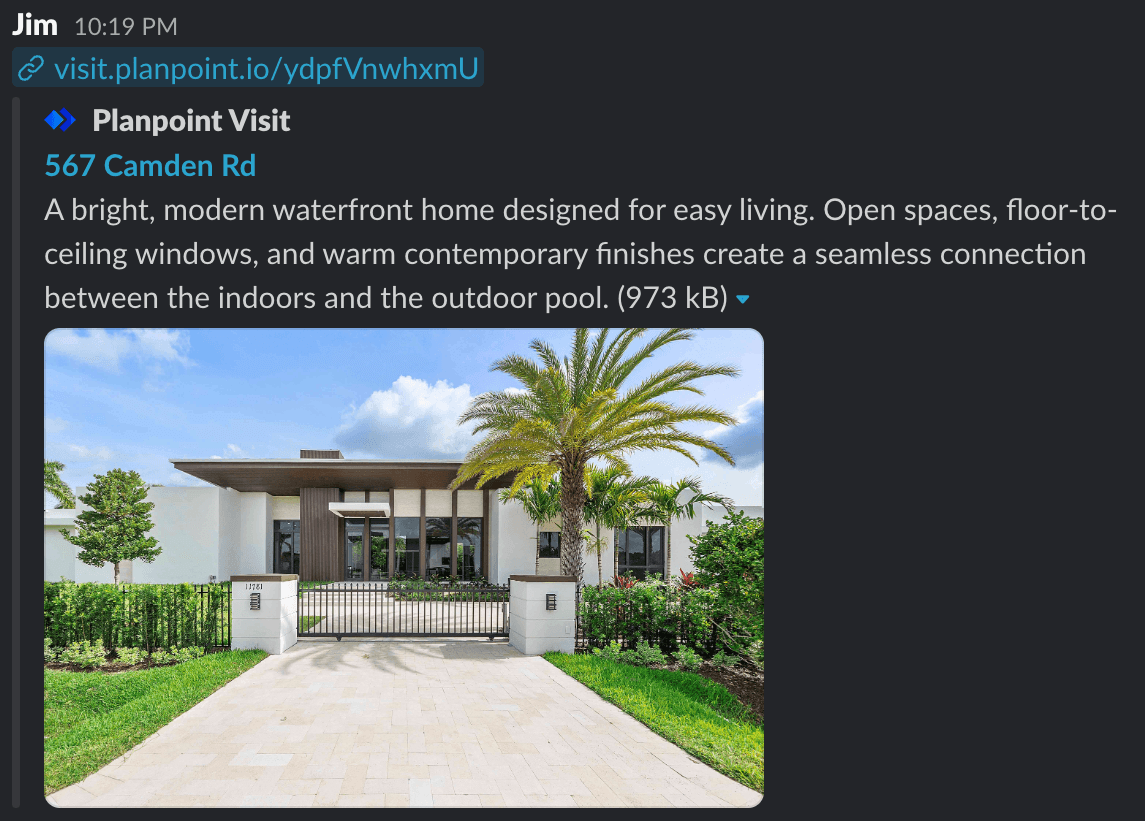
Every Visit renders Open Graph and Twitter card tags on the server, so the preview appears whether the link is pasted into WhatsApp, iMessage, LinkedIn, Slack or an email client.
 ## What is used
| Preview element | Comes from |
| --------------- | ----------------------------------------------------- |
| Title | The property **Name** in [Details](/build/details) |
| Description | The property **Description** in Details |
| Image | The **Exterior image** in [Exterior](/build/exterior) |
| URL | The [public URL](/share/public-url) |
Nothing extra to configure — fill those three fields in and the preview is right.
## Getting a good preview
* **Name** — keep it to roughly 60 characters so it is not truncated. Address first, adjectives second.
* **Description** — the first 150–160 characters are what shows. Lead with the strongest fact.
* **Exterior image** — previews are cropped near 1.91:1, so keep the building centred and out of the extreme edges.
Preview the crop before you send anything important: paste the link into a note-to-self in WhatsApp or Slack and look at the card.
## Refreshing a cached preview
Social platforms cache previews aggressively. If you change the name or exterior photo after sharing, the old card can persist for days.
Run the URL through the Facebook Sharing Debugger and click **Scrape Again**.
Use the LinkedIn Post Inspector and re-inspect the URL.
The card validator refreshes on request; otherwise the cache expires on its own after about a week.
Both cache per-conversation and clear on their own. Sending the link with a trailing `?v=2` forces a fresh fetch.
## Search engines
Visits are not submitted to search engines and the random default slug is unguessable, so a Visit is only as public as the link you send. If you want a Visit indexed, link to it from your own website.
## What is used
| Preview element | Comes from |
| --------------- | ----------------------------------------------------- |
| Title | The property **Name** in [Details](/build/details) |
| Description | The property **Description** in Details |
| Image | The **Exterior image** in [Exterior](/build/exterior) |
| URL | The [public URL](/share/public-url) |
Nothing extra to configure — fill those three fields in and the preview is right.
## Getting a good preview
* **Name** — keep it to roughly 60 characters so it is not truncated. Address first, adjectives second.
* **Description** — the first 150–160 characters are what shows. Lead with the strongest fact.
* **Exterior image** — previews are cropped near 1.91:1, so keep the building centred and out of the extreme edges.
Preview the crop before you send anything important: paste the link into a note-to-self in WhatsApp or Slack and look at the card.
## Refreshing a cached preview
Social platforms cache previews aggressively. If you change the name or exterior photo after sharing, the old card can persist for days.
Run the URL through the Facebook Sharing Debugger and click **Scrape Again**.
Use the LinkedIn Post Inspector and re-inspect the URL.
The card validator refreshes on request; otherwise the cache expires on its own after about a week.
Both cache per-conversation and clear on their own. Sending the link with a trailing `?v=2` forces a fresh fetch.
## Search engines
Visits are not submitted to search engines and the random default slug is unguessable, so a Visit is only as public as the link you send. If you want a Visit indexed, link to it from your own website.