

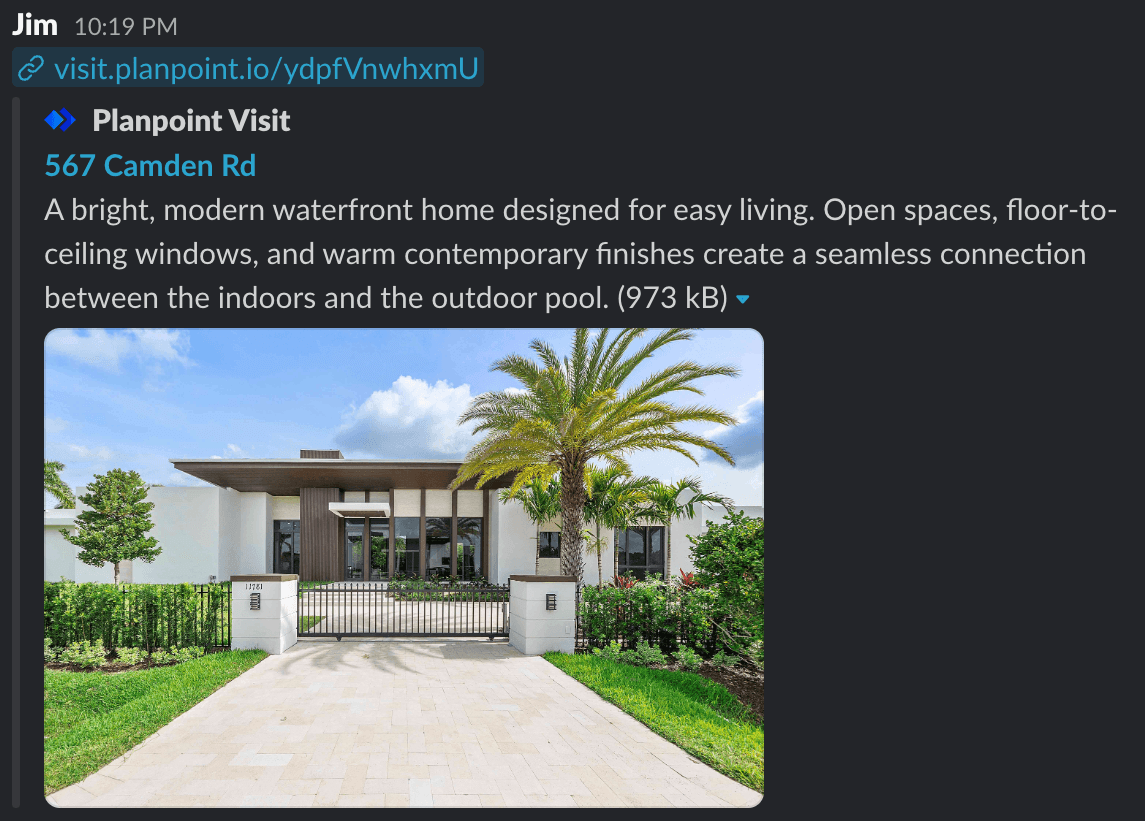
A shared link unfurls with the property name, description and exterior photo
What is used
Nothing extra to configure — fill those three fields in and the preview is right.
Getting a good preview
- Name — keep it to roughly 60 characters so it is not truncated. Address first, adjectives second.
- Description — the first 150–160 characters are what shows. Lead with the strongest fact.
- Exterior image — previews are cropped near 1.91:1, so keep the building centred and out of the extreme edges.
Refreshing a cached preview
Social platforms cache previews aggressively. If you change the name or exterior photo after sharing, the old card can persist for days.Facebook / WhatsApp
Facebook / WhatsApp
Run the URL through the Facebook Sharing Debugger and click Scrape Again.
LinkedIn
Use the LinkedIn Post Inspector and re-inspect the URL.
X / Twitter
X / Twitter
The card validator refreshes on request; otherwise the cache expires on its own after about a week.
iMessage / Slack
iMessage / Slack
Both cache per-conversation and clear on their own. Sending the link with a trailing
?v=2 forces a fresh fetch.